

RAG with Perplexity Embeddings
This guide walks through building a complete retrieval-augmented generation (RAG) pipeline using Perplexity's Embeddings API and Agent API.
It covers document chunking, embedding with both standard and contextualized models, building an in-memory vector index, querying for relevant context, and generating grounded answers.
Pipeline Overview
Section titled “Pipeline Overview”A RAG pipeline retrieves relevant information from your own documents before generating an answer, grounding model responses in your data rather than relying solely on parametric knowledge.
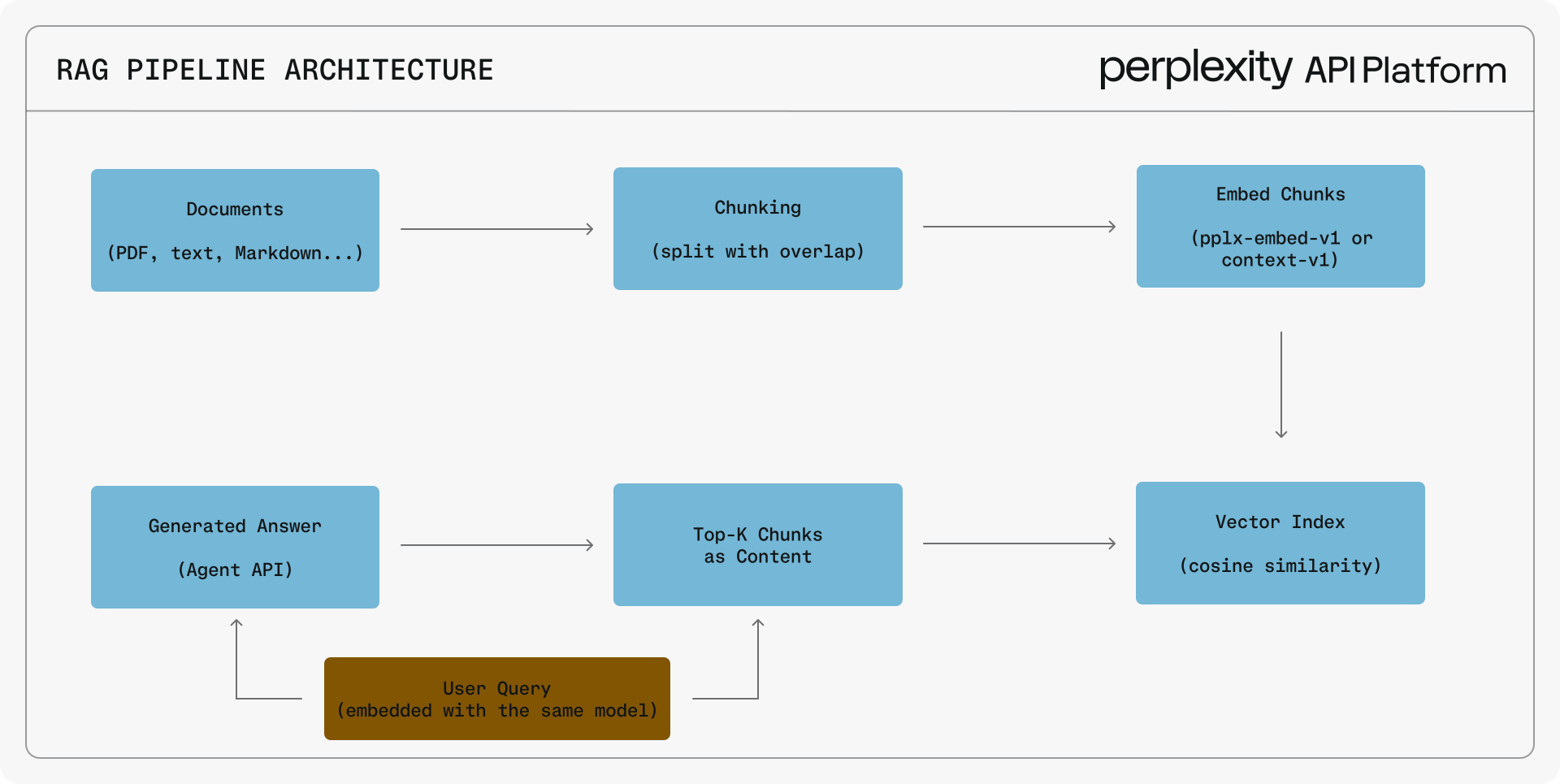
The steps are:
- Chunk your source documents into manageable pieces with overlap.
- Embed each chunk using a Perplexity embedding model.
- Index the embeddings for similarity search.
- Query by embedding the user question with the same model.
- Retrieve the top-k most similar chunks.
- Generate an answer by passing the retrieved context to the Agent API.
Prerequisites
Section titled “Prerequisites”Install the Perplexity SDK:
pip install perplexityainpm install @perplexity-ai/perplexity_aiIf you don't have an API key yet:
Get your Perplexity API Key
Navigate to the API Keys tab in the API Portal and generate a new key.
Click here
Then export your API key as an environment variable:
export PERPLEXITY_API_KEY="your-api-key"Document Chunking
Section titled “Document Chunking”Split your documents into chunks small enough for the model's context window while preserving semantic coherence. Overlapping chunks ensure that information at chunk boundaries is not lost.
def chunk_text(text: str, chunk_size: int = 500, overlap: int = 100) -> list[str]:
    """Split text into overlapping chunks by character count."""
    chunks = []
    start = 0
    while start < len(text):
        end = start + chunk_size
        chunk = text[start:end].strip()
        if chunk:
            chunks.append(chunk)
        start += chunk_size - overlap
    return chunks

document = """Retrieval-augmented generation (RAG) is a technique that combines
information retrieval with text generation. Rather than relying solely on a
language model's training data, RAG systems first search a knowledge base for
relevant documents, then use those documents as context when generating a
response. This reduces hallucinations and allows the system to provide answers
grounded in specific, up-to-date sources."""

chunks = chunk_text(document, chunk_size=300, overlap=50)
for i, chunk in enumerate(chunks):
print(f"Chunk {i} ({len(chunk)} chars): {chunk[:60]}...")function chunkText(text: string, chunkSize: number = 500, overlap: number = 100): string[] {
const chunks: string[] = [];
let start = 0;
while (start < text.length) {
const end = start + chunkSize;
const chunk = text.slice(start, end).trim();
if (chunk) chunks.push(chunk);
start += chunkSize - overlap;
}
return chunks;
}
const document = `Retrieval-augmented generation (RAG) is a technique that combines
information retrieval with text generation. Rather than relying solely on a
language model's training data, RAG systems first search a knowledge base for
relevant documents, then use those documents as context when generating a
response. This reduces hallucinations and allows the system to provide answers
grounded in specific, up-to-date sources.`;
const chunks = chunkText(document, 300, 50);
chunks.forEach((chunk, i) => {
console.log(`Chunk ${i} (${chunk.length} chars): ${chunk.slice(0, 60)}...`);
});Embedding with the Standard Model
Section titled “Embedding with the Standard Model”Standard embeddings treat each text independently. Use them when chunks are self-contained and don't rely on surrounding context.
import base64
import numpy as np
from perplexity import Perplexity

client = Perplexity()

def decode_embedding(b64_string: str) -> np.ndarray:
    """Decode a base64-encoded int8 embedding to a float32 numpy array."""
    return np.frombuffer(base64.b64decode(b64_string), dtype=np.int8).astype(np.float32)

chunks = [
    "RAG combines retrieval with generation to ground responses in real data.",
    "Document chunking splits text into overlapping segments for embedding.",
    "Cosine similarity measures the angle between two embedding vectors.",
]

response = client.embeddings.create(input=chunks, model="pplx-embed-v1-4b")
embeddings = [decode_embedding(emb.embedding) for emb in response.data]
print(f"Embedded {len(embeddings)} chunks, each with {len(embeddings[0])} dimensions")import Perplexity from '@perplexity-ai/perplexity_ai';
const client = new Perplexity();
function decodeEmbedding(b64String: string): Int8Array {
const buffer = Buffer.from(b64String, 'base64');
return new Int8Array(buffer.buffer, buffer.byteOffset, buffer.byteLength);
}
const chunks = [
"RAG combines retrieval with generation to ground responses in real data.",
"Document chunking splits text into overlapping segments for embedding.",
"Cosine similarity measures the angle between two embedding vectors.",
];
const response = await client.embeddings.create({
input: chunks,
model: "pplx-embed-v1-4b"
});
const embeddings = response.data.map(emb => decodeEmbedding(emb.embedding));
console.log(`Embedded ${embeddings.length} chunks, each with ${embeddings[0].length} dimensions`);Embedding with the Contextualized Model
Section titled “Embedding with the Contextualized Model”Contextualized embeddings understand that chunks belong to the same document. The model uses cross-chunk attention so that each chunk's embedding incorporates information from its neighbors. The key API difference is the nested array structure: each inner array contains chunks from a single document.
from perplexity import Perplexity

client = Perplexity()

# Two source documents, each split into chunks
doc1_chunks = [
    "RAG combines retrieval with generation to produce grounded answers.",
    "The retrieval step searches a vector index for chunks similar to the query.",
    "The generation step uses retrieved context to produce a final response."
]
doc2_chunks = [
    "Embedding models convert text into dense vector representations.",
    "Cosine similarity is the standard metric for comparing embeddings."
]

# Pass as nested arrays (one inner array per document)
response = client.contextualized_embeddings.create(
    input=[doc1_chunks, doc2_chunks],
    model="pplx-embed-context-v1-4b"
)

# Nested response: response.data[doc_idx].data[chunk_idx]
for doc in response.data:
    for chunk in doc.data:
print(f"Doc {doc.index}, Chunk {chunk.index}: {chunk.embedding[:20]}...")import Perplexity from '@perplexity-ai/perplexity_ai';
const client = new Perplexity();
const doc1Chunks = [
"RAG combines retrieval with generation to produce grounded answers.",
"The retrieval step searches a vector index for chunks similar to the query.",
"The generation step uses retrieved context to produce a final response."
];
const doc2Chunks = [
"Embedding models convert text into dense vector representations.",
"Cosine similarity is the standard metric for comparing embeddings."
];
// Pass as nested arrays (one inner array per document)
const response = await client.contextualizedEmbeddings.create({
input: [doc1Chunks, doc2Chunks],
model: "pplx-embed-context-v1-4b"
});
// Nested response: response.data[docIdx].data[chunkIdx]
for (const doc of response.data) {
for (const chunk of doc.data) {
console.log(`Doc ${doc.index}, Chunk ${chunk.index}: ${chunk.embedding.slice(0, 20)}...`);
}
}Querying a Contextualized Index
Section titled “Querying a Contextualized Index”When using contextualized embeddings, wrap each query as a single-element inner list (e.g., [[query]]) so the API treats it as a single-chunk document:
from perplexity import Perplexity
import base64, numpy as np

client = Perplexity()

def decode_embedding(b64: str) -> np.ndarray:
    return np.frombuffer(base64.b64decode(b64), dtype=np.int8).astype(np.float32)

def cosine_similarity(a: np.ndarray, b: np.ndarray) -> float:
    return float(np.dot(a, b) / (np.linalg.norm(a) * np.linalg.norm(b)))

# Index with contextualized model (chunks share cross-chunk attention)
doc_chunks = [
    "RAG combines retrieval with generation to produce grounded answers.",
    "The retrieval step finds chunks similar to the user query.",
    "The generation step uses retrieved context to produce a final response.",
]
ctx_response = client.contextualized_embeddings.create(
    input=[doc_chunks],  # nested array: one inner list per document
    model="pplx-embed-context-v1-4b"
)
index = [
    {"embedding": decode_embedding(chunk.embedding), "text": doc_chunks[chunk.index]}
    for chunk in ctx_response.data[0].data
]

# Query the index
query = "How does retrieval work in RAG?"
q_response = client.contextualized_embeddings.create(
    input=[[query]], model="pplx-embed-context-v1-4b"
)
q_emb = decode_embedding(q_response.data[0].data[0].embedding)
results = sorted(index, key=lambda x: cosine_similarity(q_emb, x["embedding"]), reverse=True)
print(f"Top result: {results[0]['text']}")import Perplexity from '@perplexity-ai/perplexity_ai';
const client = new Perplexity();
function decodeEmbedding(b64: string): Int8Array {
const buffer = Buffer.from(b64, 'base64');
return new Int8Array(buffer.buffer, buffer.byteOffset, buffer.byteLength);
}
function cosineSimilarity(a: Int8Array, b: Int8Array): number {
let dot = 0, normA = 0, normB = 0;
for (let i = 0; i < a.length; i++) {
dot += a[i] * b[i]; normA += a[i] ** 2; normB += b[i] ** 2;
}
return dot / (Math.sqrt(normA) * Math.sqrt(normB));
}
// Index with contextualized model
const docChunks = [
"RAG combines retrieval with generation to produce grounded answers.",
"The retrieval step finds chunks similar to the user query.",
"The generation step uses retrieved context to produce a final response.",
];
const ctxResponse = await client.contextualizedEmbeddings.create({
input: [docChunks], // nested array: one inner array per document
model: "pplx-embed-context-v1-4b"
});
const index = ctxResponse.data[0].data.map(chunk => ({
embedding: decodeEmbedding(chunk.embedding),
text: docChunks[chunk.index],
}));
// Query the index
const query = "How does retrieval work in RAG?";
const qResponse = await client.contextualizedEmbeddings.create({
input: [[query]], model: "pplx-embed-context-v1-4b"
});
const qEmb = decodeEmbedding(qResponse.data[0].data[0].embedding);
const results = [...index].sort((a, b) => cosineSimilarity(qEmb, b.embedding) - cosineSimilarity(qEmb, a.embedding));
console.log(`Top result: ${results[0].text}`);Building a Vector Index
Section titled “Building a Vector Index”This example uses numpy for cosine similarity with a simple in-memory index. For production systems with millions of vectors, use a dedicated vector database (Pinecone, Weaviate, Qdrant, etc.).
import base64
import numpy as np
from perplexity import Perplexity

client = Perplexity()

def decode_embedding(b64_string: str) -> np.ndarray:
    return np.frombuffer(base64.b64decode(b64_string), dtype=np.int8).astype(np.float32)

def cosine_similarity(a: np.ndarray, b: np.ndarray) -> float:
    return float(np.dot(a, b) / (np.linalg.norm(a) * np.linalg.norm(b)))

# Documents to index
documents = {
    "RAG Overview": [
        "Retrieval-augmented generation grounds LLM responses in external data.",
        "RAG reduces hallucinations by providing factual context to the model.",
        "A typical RAG pipeline has three stages: indexing, retrieval, and generation."
    ],
    "Embedding Models": [
        "Embedding models map text to dense vector representations.",
        "Similar texts produce vectors that are close in the embedding space.",
        "Perplexity offers both standard and contextualized embedding models."
    ]
}

# Build index: list of (embedding, text, doc_title) tuples
index = []
for title, chunks in documents.items():
    response = client.embeddings.create(input=chunks, model="pplx-embed-v1-4b")
    for emb_obj in response.data:
        index.append({
            "embedding": decode_embedding(emb_obj.embedding),
            "text": chunks[emb_obj.index],
            "doc_title": title
        })

print(f"Indexed {len(index)} chunks")import Perplexity from '@perplexity-ai/perplexity_ai';
const client = new Perplexity();
function decodeEmbedding(b64String: string): Int8Array {
const buffer = Buffer.from(b64String, 'base64');
return new Int8Array(buffer.buffer, buffer.byteOffset, buffer.byteLength);
}
function cosineSimilarity(a: Int8Array, b: Int8Array): number {
let dot = 0, normA = 0, normB = 0;
for (let i = 0; i < a.length; i++) {
dot += a[i] * b[i];
normA += a[i] * a[i];
normB += b[i] * b[i];
}
return dot / (Math.sqrt(normA) * Math.sqrt(normB));
}
const documents: Record<string, string[]> = {
"RAG Overview": [
"Retrieval-augmented generation grounds LLM responses in external data.",
"RAG reduces hallucinations by providing factual context to the model.",
"A typical RAG pipeline has three stages: indexing, retrieval, and generation."
],
"Embedding Models": [
"Embedding models map text to dense vector representations.",
"Similar texts produce vectors that are close in the embedding space.",
"Perplexity offers both standard and contextualized embedding models."
]
};
// Build index
const index: { embedding: Int8Array; text: string; docTitle: string }[] = [];
for (const [title, chunks] of Object.entries(documents)) {
const response = await client.embeddings.create({
input: chunks,
model: "pplx-embed-v1-4b"
});
for (const embObj of response.data) {
index.push({
embedding: decodeEmbedding(embObj.embedding),
text: chunks[embObj.index],
docTitle: title
});
}
}
console.log(`Indexed ${index.length} chunks`);Query Pipeline
Section titled “Query Pipeline”The full query pipeline embeds the user question, retrieves the top-k most similar chunks, and passes them as context to the Agent API for answer generation.
def rag_query(question: str, index: list[dict], top_k: int = 3, min_score: float = 0.3) -> str:
    """Embed question -> retrieve similar chunks -> generate answer."""
    # Step 1: Embed the question
    query_response = client.embeddings.create(input=[question], model="pplx-embed-v1-4b")
    query_emb = decode_embedding(query_response.data[0].embedding)

    # Step 2: Retrieve top-k chunks above the minimum similarity threshold
    scored = sorted(
        [{"score": cosine_similarity(query_emb, item["embedding"]), **item} for item in index],
        key=lambda x: x["score"], reverse=True
    )[:top_k]
    scored = [item for item in scored if item["score"] >= min_score]

    if not scored:
        return "No relevant context found for this question."

    # Include source attribution alongside each chunk
    context = "\n\n".join(
        f"[Source: {item['doc_title']}]\n{item['text']}" for item in scored
    )

    # Step 3: Generate answer via Agent API
    response = client.responses.create(
        model="openai/gpt-5.6-terra",
        input=question,
        instructions=(
            "Answer based only on the provided context. "
            "Cite sources by name when referencing specific information. "
            "If the context does not contain enough information, say so.\n\n"
            f"Context:\n{context}"
        )
    )
    return response.output_text

answer = rag_query("What are the stages of a RAG pipeline?", index)
print(answer)async function ragQuery(question: string, idx: typeof index, topK: number = 3, minScore: number = 0.3): Promise<string> {
// Step 1: Embed the question
const qResponse = await client.embeddings.create({
input: [question], model: "pplx-embed-v1-4b"
});
const qEmb = decodeEmbedding(qResponse.data[0].embedding);
// Step 2: Retrieve top-k chunks above the minimum similarity threshold
const scored = idx
.map(item => ({ ...item, score: cosineSimilarity(qEmb, item.embedding) }))
.sort((a, b) => b.score - a.score)
.slice(0, topK)
.filter(item => item.score >= minScore);
if (scored.length === 0) {
return "No relevant context found for this question.";
}
// Include source attribution alongside each chunk
const context = scored
.map(item => `[Source: ${item.docTitle}]\n${item.text}`)
.join("\n\n");
// Step 3: Generate answer via Agent API
const response = await client.responses.create({
model: "openai/gpt-5.6-terra",
input: question,
instructions: `Answer based only on the provided context. Cite sources by name when referencing specific information. If the context does not contain enough information, say so.\n\nContext:\n${context}`
});
return response.output_text;
}
const answer = await ragQuery("What are the stages of a RAG pipeline?", index);
console.log(answer);Standard vs Contextualized Comparison
Section titled “Standard vs Contextualized Comparison”| Aspect | Standard (pplx-embed-v1-4b) |
Contextualized (pplx-embed-context-v1-4b) |
|---|---|---|
| Input format | Flat list of texts | Nested arrays grouped by document |
| Context awareness | Each text embedded independently | Chunks share cross-chunk context within each document |
| Best for | FAQ entries, standalone texts, short documents | Document paragraphs, article sections |
| Chunk ordering | Order does not matter | Must be in original document order |
| Query embedding | client.embeddings.create(input=[query]) |
client.contextualized_embeddings.create(input=[[query]]) |
| Price (4b model) | $0.03 / 1M tokens | $0.05 / 1M tokens |
When to Use Standard Embeddings
Section titled “When to Use Standard Embeddings”- Chunks are self-contained and do not rely on surrounding context.
- Your content consists of FAQ pairs, product descriptions, or short independent entries.
- You need the lowest cost per token.
When to Use Contextualized Embeddings
Section titled “When to Use Contextualized Embeddings”- Chunks come from longer documents where meaning depends on neighboring text.
- A chunk like "This approach improves performance by 20%" only makes sense with its surrounding context.
- You are embedding paragraphs from articles, reports, or technical documentation.
- You want higher retrieval accuracy at a modest cost increase.
Matryoshka Dimensions
Section titled “Matryoshka Dimensions”Perplexity embedding models support Matryoshka Representation Learning (MRL), which concentrates the most important information in the first N dimensions. You can request reduced dimensions directly via the API for faster search and smaller storage.
import base64
import numpy as np
from perplexity import Perplexity

client = Perplexity()

texts = ["Matryoshka embeddings allow dimension reduction without re-embedding."]

def decode_embedding(b64: str) -> np.ndarray:
    return np.frombuffer(base64.b64decode(b64), dtype=np.int8)

# Full dimensions (2560 for 4b model)
full = client.embeddings.create(input=texts, model="pplx-embed-v1-4b")

# Reduced to 512 dimensions via the API
reduced = client.embeddings.create(input=texts, model="pplx-embed-v1-4b", dimensions=512)

print(f"Full: {len(decode_embedding(full.data[0].embedding))} dimensions")
print(f"Reduced: {len(decode_embedding(reduced.data[0].embedding))} dimensions")import Perplexity from '@perplexity-ai/perplexity_ai';
const client = new Perplexity();
const texts = ["Matryoshka embeddings allow dimension reduction without re-embedding."];
function decodeEmbedding(b64: string): Int8Array {
const buffer = Buffer.from(b64, 'base64');
return new Int8Array(buffer.buffer, buffer.byteOffset, buffer.byteLength);
}
// Full dimensions (2560 for 4b model)
const full = await client.embeddings.create({ input: texts, model: "pplx-embed-v1-4b" });
// Reduced to 512 dimensions via the API
const reduced = await client.embeddings.create({
input: texts, model: "pplx-embed-v1-4b", dimensions: 512
});
console.log(`Full: ${decodeEmbedding(full.data[0].embedding).length} dimensions`);
console.log(`Reduced: ${decodeEmbedding(reduced.data[0].embedding).length} dimensions`);Dimension reduction tradeoffs for the pplx-embed-v1-4b model:
| Dimensions | Storage per Vector | Relative Quality | Use Case |
|---|---|---|---|
| 2560 (full) | 2.5 KB | Highest | Maximum accuracy, small datasets |
| 1024 | 1 KB | Very high | Good balance for most applications |
| 512 | 512 B | High | Large-scale retrieval, fast search |
| 256 | 256 B | Moderate | Extremely large datasets, coarse filtering |
| 128 | 128 B | Lower | First-pass candidate filtering |
Batch Processing
Section titled “Batch Processing”When embedding large document collections, process them in batches to stay within API rate limits. The standard API accepts up to 512 texts per request with a combined limit of 120,000 tokens.
import asyncio
import base64
import numpy as np
from perplexity import AsyncPerplexity

def decode_embedding(b64_string: str) -> np.ndarray:
    return np.frombuffer(base64.b64decode(b64_string), dtype=np.int8).astype(np.float32)

async def batch_embed(texts: list[str], batch_size: int = 100) -> list[np.ndarray]:
    """Embed texts in batches with rate limiting."""
    async with AsyncPerplexity() as client:
        all_embeddings = []
        for i in range(0, len(texts), batch_size):
            batch = texts[i:i + batch_size]
            response = await client.embeddings.create(
                input=batch, model="pplx-embed-v1-4b"
            )
            all_embeddings.extend(decode_embedding(e.embedding) for e in response.data)
            print(f"Embedded {min(i + batch_size, len(texts))}/{len(texts)}")
            if i + batch_size < len(texts):
                await asyncio.sleep(0.1)  # Brief delay between batches
        return all_embeddings

# Usage
texts = [f"Document chunk number {i} with content." for i in range(500)]
embeddings = asyncio.run(batch_embed(texts, batch_size=100))
print(f"Total: {len(embeddings)} embeddings")import Perplexity from '@perplexity-ai/perplexity_ai';
const client = new Perplexity();
function decodeEmbedding(b64String: string): Int8Array {
const buffer = Buffer.from(b64String, 'base64');
return new Int8Array(buffer.buffer, buffer.byteOffset, buffer.byteLength);
}
async function batchEmbed(texts: string[], batchSize: number = 100): Promise<Int8Array[]> {
const allEmbeddings: Int8Array[] = [];
for (let i = 0; i < texts.length; i += batchSize) {
const batch = texts.slice(i, i + batchSize);
const response = await client.embeddings.create({
input: batch, model: "pplx-embed-v1-4b"
});
allEmbeddings.push(...response.data.map(e => decodeEmbedding(e.embedding)));
console.log(`Embedded ${Math.min(i + batchSize, texts.length)}/${texts.length}`);
if (i + batchSize < texts.length) {
await new Promise(r => setTimeout(r, 100)); // Brief delay between batches
}
}
return allEmbeddings;
}
// Usage
const texts = Array.from({ length: 500 }, (_, i) => `Document chunk number ${i} with content.`);
const embeddings = await batchEmbed(texts, 100);
console.log(`Total: ${embeddings.length} embeddings`);Complete Example
Section titled “Complete Example”A self-contained pipeline that indexes two documents with contextualized embeddings and answers questions against the indexed content.
import base64
import numpy as np
from perplexity import Perplexity

client = Perplexity()

# --- Helpers ---

def chunk_text(text: str, chunk_size: int = 400, overlap: int = 80) -> list[str]:
    chunks, start = [], 0
    while start < len(text):
        chunk = text[start:start + chunk_size].strip()
        if chunk:
            chunks.append(chunk)
        start += chunk_size - overlap
    return chunks

def decode_embedding(b64: str) -> np.ndarray:
    return np.frombuffer(base64.b64decode(b64), dtype=np.int8).astype(np.float32)

def cosine_similarity(a: np.ndarray, b: np.ndarray) -> float:
    return float(np.dot(a, b) / (np.linalg.norm(a) * np.linalg.norm(b)))

# --- Source documents ---

DOCUMENTS = {
    "Quantum Computing": (
        "Quantum computers use qubits that can exist in superposition, representing "
        "0 and 1 simultaneously. Unlike classical bits, qubits leverage quantum "
        "interference to perform calculations. Quantum entanglement allows qubits to "
        "be correlated, enabling parallel processing at scale. Current quantum computers "
        "from IBM, Google, and others have dozens to hundreds of physical qubits."
    ),
    "Machine Learning": (
        "Machine learning enables computers to learn from data without explicit "
        "programming. Supervised learning uses labeled examples to train models for "
        "classification and regression. Neural networks with many layers (deep learning) "
        "excel at image recognition and language tasks. Training requires large datasets "
        "and significant compute, often using GPUs or TPUs."
    ),
}

# --- Step 1: Index with the model ---

def build_index(documents: dict[str, str]) -> list[dict]:
    index = []
    for title, text in documents.items():
        chunks = chunk_text(text)
        response = client.contextualized_embeddings.create(
            input=[chunks],
            model="pplx-embed-context-v1-4b"
        )
        for chunk_obj in response.data[0].data:
            index.append({
                "embedding": decode_embedding(chunk_obj.embedding),
                "text": chunks[chunk_obj.index],
                "doc_title": title,
            })
    print(f"Indexed {len(index)} chunks from {len(documents)} documents")
    return index

# --- Step 2: Query the index, retrieve, generate ---

def rag_query(question: str, index: list[dict], top_k: int = 3, min_score: float = 0.3) -> str:
    q_resp = client.contextualized_embeddings.create(
        input=[[question]], model="pplx-embed-context-v1-4b"
    )
    q_emb = decode_embedding(q_resp.data[0].data[0].embedding)

    results = sorted(
        [{"score": cosine_similarity(q_emb, item["embedding"]), **item} for item in index],
        key=lambda x: x["score"], reverse=True
    )[:top_k]
    results = [r for r in results if r["score"] >= min_score]

    if not results:
        return "No relevant context found for this question."

    context = "\n\n".join(f"[{r['doc_title']}]\n{r['text']}" for r in results)

    response = client.responses.create(
        model="openai/gpt-5.6-terra",
        input=question,
        instructions=(
            "Answer based only on the provided context. "
            "Cite the source name in brackets when referencing information. "
            "If the context is insufficient, say so.\n\n"
            f"Context:\n{context}"
        )
    )
    return response.output_text

# --- Run ---

if __name__ == "__main__":
    index = build_index(DOCUMENTS)

    questions = [
        "What makes qubits different from classical bits?",
        "What hardware is used to train machine learning models?",
    ]
    for q in questions:
        print(f"\nQ: {q}")
print(f"A: {rag_query(q, index)}")import Perplexity from '@perplexity-ai/perplexity_ai';
const client = new Perplexity();
// --- Helpers ---
function chunkText(text: string, chunkSize = 400, overlap = 80): string[] {
const chunks: string[] = [];
let start = 0;
while (start < text.length) {
const chunk = text.slice(start, start + chunkSize).trim();
if (chunk) chunks.push(chunk);
start += chunkSize - overlap;
}
return chunks;
}
function decodeEmbedding(b64: string): Int8Array {
const buffer = Buffer.from(b64, 'base64');
return new Int8Array(buffer.buffer, buffer.byteOffset, buffer.byteLength);
}
function cosineSimilarity(a: Int8Array, b: Int8Array): number {
let dot = 0, normA = 0, normB = 0;
for (let i = 0; i < a.length; i++) {
dot += a[i] * b[i]; normA += a[i] ** 2; normB += b[i] ** 2;
}
return dot / (Math.sqrt(normA) * Math.sqrt(normB));
}
// --- Source documents ---
const DOCUMENTS: Record<string, string> = {
"Quantum Computing": "Quantum computers use qubits that can exist in superposition, representing 0 and 1 simultaneously. Unlike classical bits, qubits leverage quantum interference to perform calculations. Quantum entanglement allows qubits to be correlated, enabling parallel processing at scale. Current quantum computers from IBM, Google, and others have dozens to hundreds of physical qubits.",
"Machine Learning": "Machine learning enables computers to learn from data without explicit programming. Supervised learning uses labeled examples to train models for classification and regression. Neural networks with many layers (deep learning) excel at image recognition and language tasks. Training requires large datasets and significant compute, often using GPUs or TPUs.",
};
type IndexEntry = { embedding: Int8Array; text: string; docTitle: string };
// --- Step 1: Index with the model ---
async function buildIndex(documents: Record<string, string>): Promise<IndexEntry[]> {
const index: IndexEntry[] = [];
for (const [title, text] of Object.entries(documents)) {
const chunks = chunkText(text);
const response = await client.contextualizedEmbeddings.create({
input: [chunks],
model: "pplx-embed-context-v1-4b"
});
for (const chunkObj of response.data[0].data) {
index.push({
embedding: decodeEmbedding(chunkObj.embedding),
text: chunks[chunkObj.index],
docTitle: title,
});
}
}
console.log(`Indexed ${index.length} chunks from ${Object.keys(documents).length} documents`);
return index;
}
// --- Step 2: Query the index, retrieve, generate ---
async function ragQuery(
question: string,
index: IndexEntry[],
topK = 3,
minScore = 0.3
): Promise<string> {
const qResp = await client.contextualizedEmbeddings.create({
input: [[question]], model: "pplx-embed-context-v1-4b"
});
const qEmb = decodeEmbedding(qResp.data[0].data[0].embedding);
const results = index
.map(item => ({ ...item, score: cosineSimilarity(qEmb, item.embedding) }))
.sort((a, b) => b.score - a.score)
.slice(0, topK)
.filter(r => r.score >= minScore);
if (results.length === 0) return "No relevant context found for this question.";
const context = results.map(r => `[${r.docTitle}]\n${r.text}`).join("\n\n");
const response = await client.responses.create({
model: "openai/gpt-5.6-terra",
input: question,
instructions: `Answer based only on the provided context. Cite the source name in brackets when referencing information. If the context is insufficient, say so.\n\nContext:\n${context}`,
});
return response.output_text;
}
// --- Run ---
const index = await buildIndex(DOCUMENTS);
const questions = [
"What makes qubits different from classical bits?",
"What hardware is used to train machine learning models?",
];
for (const q of questions) {
console.log(`\nQ: ${q}`);
console.log(`A: ${await ragQuery(q, index)}`);
}Next Steps
Section titled “Next Steps”Standard Embeddings
API reference for standard embedding parameters and response format.
Contextualized Embeddings
API reference for contextualized embedding parameters and response format.
Best Practices
Encoding formats, similarity metrics, normalization, and error handling.
Agent API
Learn more about the Responses API used for answer generation.